The Ultimate Guide to WhatsApp Business Automation with n8n and Peach AI
Managing customer communication manually on WhatsApp is one of the quickest ways to bottleneck a growing business. When your team is stuck copy-pasting invoice links, manually qualifying leads, or typing out individual responses, operations slow down and leads go cold.
By connecting n8n - the powerful workflow automation tool - with Peach AI’s WhatsApp infrastructure, you can fully automate these customer touchpoints.
This guide explores what is possible with this integration, details three common real-world workflows you can deploy today, and outlines the essential setup steps and caveats you need to keep in mind.
Why Connect n8n with Peach AI?
Using n8n alongside Peach AI gives you the best of both worlds: n8n handles the logic, data fetching, and routing across your business stack (like your CRM, databases, or forms), while Peach AI handles the underlying complexities of Meta’s WhatsApp Business API.
- Drag-and-Drop WhatsApp Logic: You don’t need to write custom integration code or manage complex webhook endpoints to send a WhatsApp message.
- Unified Contact Preferences: Seamlessly handle opt-ins and opt-outs across your entire business system, protecting your phone number’s quality rating.
- AI Agent Handoffs: Instead of rigid, broken chatbots, you can temporarily hand a conversation over to a specialized Peach AI micro-agent to gather info or schedule calls, then pull the structured data back into n8n.
What is Possible? (Core Capabilities)
With the native Peach AI node installed in your n8n workspace, you can perform four primary actions:
- Launch Broadcasts: Send bulk, personalized outreach campaigns to specific lists of contacts instantly or on a scheduled timer.
- Send Template Messages: Push transactional notifications, PDFs, invoices, and confirmation messages in response to real-time events.
- Manage Contacts: Create or update contact records, change opt-in statuses, and sync metadata with your central databases.
- Initiate AI Handoff: Route a specific contact to a specialized, task-oriented AI agent to resolve a customer support issue or qualify a lead conversationally.
3 Essential WhatsApp Workflows to Build
Here are three of the most common workflows businesses build to automate operations using n8n and Peach AI.
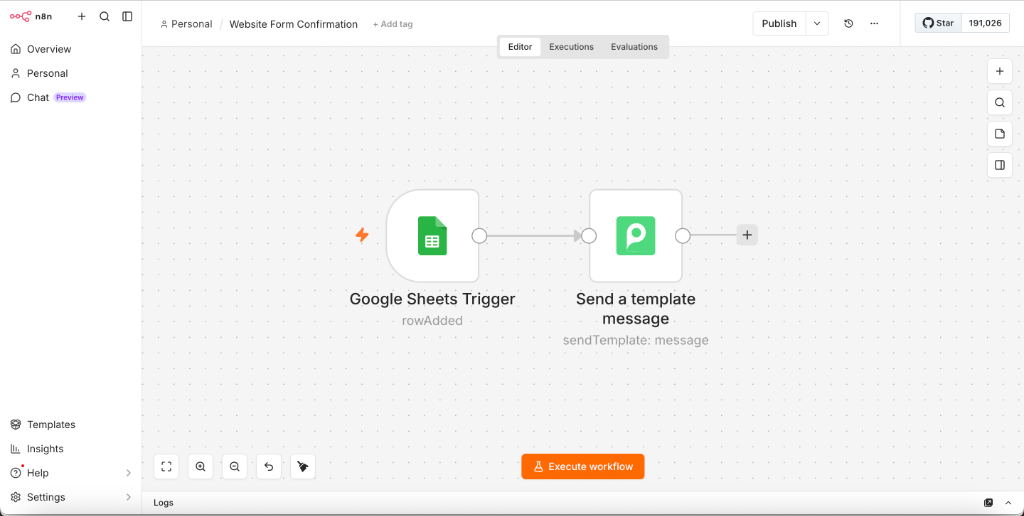
Workflow 1: Instant Invoice Dispatch & Lead Notifications
The Goal: The moment a lead fills out a form on your website or an invoice is generated in your billing system, send them a highly personalized WhatsApp template message with their details or invoice link.
Workflow Flow:
Trigger → Format Number → Peach: Send Template
How it works:
- The Trigger: A new submission is captured (e.g., from Typeform, Google Sheets, or a Stripe webhook).
- Number Formatting: WhatsApp requires numbers in standard E.164 formatting (with country code, no spaces, and no special characters like
+or-). - Peach Node Execution: The n8n workflow passes the clean phone number and dynamic values (like the customer’s name and PDF link) to Peach to deliver the template instantly.
📋 Copy Expression
Use this expression inside your Peach node’s phone number field to automatically clean up common formatting issues from incoming phone numbers:
{{ $json.phone_number.replace(/[^0-9]/g, '') }}
Workflow 2: Conversational Lead Qualification (AI Agent Handoff)
The Goal: Instead of forcing leads to fill out a 15-field form, capture just their phone number. Then, have an AI conversational agent message them on WhatsApp to gather their company size, use case, and budget before handing them over to your sales team.
Workflow Flow:
New Contact Trigger → Peach: AI Handoff → AI Qualifies → Sync to CRM
How it works:
- The Trigger: A new contact is created in your CRM (like HubSpot or Zoho) with a phone number.
- The Handoff: n8n calls the AI Handoff action in the Peach node. This pauses any manual campaigns and assigns the conversation to a specialized lead-qualification agent in Peach.
- The Conversation: The AI agent chats naturally with the user on WhatsApp, asking questions and collecting structural data based on its system prompt.
- The Resolution: Once the agent successfully gathers the required fields, it can update the contact’s metadata in Peach, triggering another n8n workflow to update your CRM and ping your sales reps in Slack.
Workflow 3: Automated Broadcast Campaigns from Google Sheets or CRM
The Goal: Send a bulk promotional offer or customer announcement to a list of contacts stored in a Google Sheet or database without hitting rate limits.
Workflow Flow:
Fetch Contacts → Aggregate to Array → Peach: Launch Broadcast
How it works:
- The Source: n8n fetches rows from Google Sheets, PostgreSQL, or your CRM.
- The Aggregator: Instead of looping through and sending individual messages (which is slow and can fail mid-way), n8n’s Aggregate node compiles all those contacts into a single JSON array.
- The Broadcast: Peach AI ingests the entire array in a single API call and handles the queuing, rate-limiting, and distribution safely in the background.
📋 Copy Expression
To map your aggregated contact list correctly inside the Launch a Broadcast action in n8n, switch the “Contacts” input to Expression mode and paste:
{{
  $json.contacts.map(item => ({
    "to": item.Phone_Number,
    "variables": {
      "name": item.First_Name
    }
  }))
}}
Handling Inbound Messages & Two-Way Automation
When building two-way conversational flows, it is tempting to build complex back-and-forth loops entirely within n8n using multiple webhook triggers, HTTP requests, and conditional branches.
However, building chatty back-and-forth bots in n8n is difficult to maintain and often results in laggy user experiences.
Instead, the best practice is to offload the conversational logic to Peach. Let Peach’s specialized AI agents handle the active, conversational user journey, and simply configure Peach to notify your n8n workflow once the interaction is resolved (e.g., when a lead is qualified or a support ticket is created). This keeps your n8n canvases clean, lightweight, and focused purely on business integrations.
If you do need to capture raw inbound messages or agent status events:
- Create a Webhook Trigger node in n8n.
- Copy the Production URL from the trigger.
- Paste the URL into your Peach Dashboard under Settings > Developer > Webhooks.
Setup Guide: Connecting n8n to Peach AI
Getting this integration up and running takes less than 5 minutes.
Step 1: Install the Peach Community Node
If you are running self-hosted n8n or using n8n cloud:
- Open your n8n Instance and go to Settings > Community Nodes.
- Click Install a Node and enter the Peach package name:
n8n-nodes-peach. - Once installed, the Peach node will appear in your workflow node search menu.
Step 2: Generate an API Token in Peach
- Log into your Peach Dashboard.
- Navigate to Settings > Developer > API Keys.
- Click Create New Token, give it a name (e.g., n8n Production), and copy the generated token.
Step 3: Add Credentials in n8n
- In your n8n workspace, add any Peach node to your canvas.
- Click the Credential dropdown inside the node settings and select Create New Credential.
- Paste your Peach API token into the field and click Save.
Important Caveats & Best Practices
When building automated workflows with n8n and the WhatsApp Business API, keep these technical guardrails in mind:
- Meta’s Strict Template Approvals: You cannot send arbitrary, free-form text messages to users who haven’t messaged you first in the last 24 hours. You must use pre-approved templates. If your template variable has missing or empty data (e.g., trying to send a message to a contact without a first_name defined), Meta will reject the message. Always use logical fallbacks in your n8n expressions (e.g.,
{{ $json.name || 'there' }}). - Opt-in Compliance: Meta heavily penalizes phone numbers that get blocked by recipients. If your quality rating drops, your daily sending limits will be drastically restricted. Make sure to build an “Opt-Out” branch in your webhook flows so that if a user replies “STOP” or “UNSUBSCRIBE,” your n8n workflow instantly updates their preference state to opt them out of future broadcasts.
- Rate Limits and Delay Buffers: When executing heavy data loops directly in n8n, Meta may occasionally rate-limit excessive, simultaneous API hits. If you aren’t using Peach’s bulk broadcast endpoint and are instead calling individual message endpoints in a loop, introduce a small delay buffer node of at least 1 second between executions to keep your workflow stable.
- Variable Count Sync: Ensure the number of parameters passed from n8n matches the exact number of double-bracket variables in your approved Meta template. Passing fewer or more variables than expected will result in an immediate delivery failure.
Frequently Asked Questions
What is the exact npm package name for the Peach n8n node?
The node is published as n8n-nodes-peach. You can install it directly from your n8n community node settings panel.
Can I trigger n8n workflows from incoming WhatsApp replies?
Yes. By pasting an n8n Webhook URL into the Webhooks section of your Peach dashboard, Peach will forward all inbound messages, delivery status updates, and AI agent events directly to your workflow.
Is a pre-verified Meta Business Manager required to start testing?
No. You can start building and testing your n8n integrations immediately using the Peach Sandbox environment. When you're ready to go live, Peach simplifies the official Meta verification process to under 10 minutes.
Are there any markup charges for sending WhatsApp messages via Peach?
No. Peach passes through Meta's official conversation rates with $0 markup. You only pay for your active subscription plan and Meta's direct costs.
Prerequisites
- Peach Account
- n8n Instance (Cloud or Self-Hosted)